FIELD OPERATIONS PLATFORM

Your field team,
in one place.

GraftLync is the Android app and office dashboard built for engineers on the road. Timesheets with GPS, expenses, daily vehicle checks, install manuals and team updates — filled in from the van, checked from the office, synced live.

Built for engineers on the road
Every change tracked for the office
Vehicle check done
Weekly Timesheet
12 – 16 Oct
38.5 hrs
MON
8.0
TUE
7.5
WED
8.0
THU
7.5
FRI
7.5
On site · GPS
DC4 — arrived 07:32
8h 05m
Fuel receipt
£42.10 · photo attached
Paid
AB12 CDE
No defects · 07:20
WHY GRAFTLYNC
Zeropaper timesheets
Livevan-to-office sync
Everyedit on record
WHAT GRAFTLYNC DOES

One app for the engineer. One dashboard for the office.

Engineers use the Android app through the day. The office sees everything on the web dashboard as it happens — no chasing paperwork at the end of the week.

Timesheets with GPS

Add a job when you arrive; GPS fills in real arrival and leave times. Travel time, notes and up to five jobs a day, with a full history of previous weeks.

ENGINEER APP + OFFICE

Expenses & receipts

Snap the receipt, add the amount, done. The office marks claims paid or sends them back with a reason, and the engineer can fix and resubmit.

ENGINEER APP + OFFICE

Daily vehicle checks

A full walkaround checklist — lights, tyres, fluids, safety kit, documents. Defects need a note and a photo; the office gets a PDF of every check.

APP OR WEB · PDF FOR OFFICE

Install manuals & updates

Step-by-step install guides with photos, plus a weekly team news feed — so everyone on the road knows how it's done and what's changed.

WHOLE TEAM

Every change on record

If a timesheet is edited after it was entered, the office sees what it originally said, what it says now, who changed it and when — on screen and on the PDF.

OFFICE DASHBOARD

Team & roles

Engineers, office and owners each see exactly what they need. New starters sign up themselves and are approved by the admin before they get in.

ADMIN
IN DEVELOPMENT

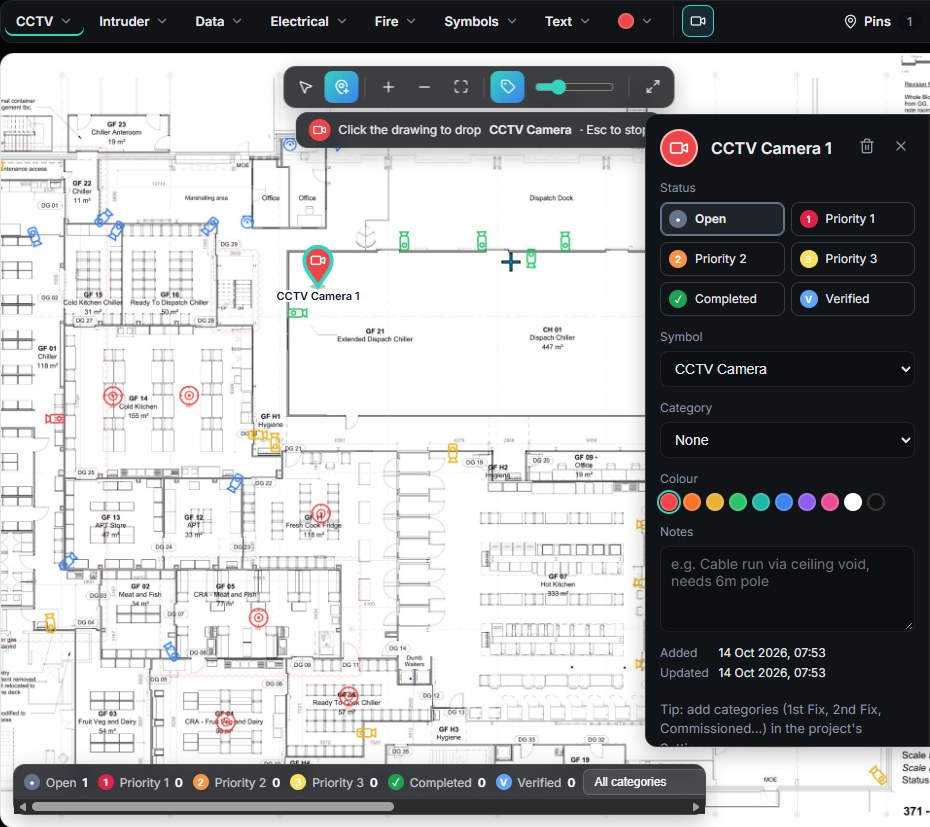
Site Plans

Put the drawings to work. Upload a site's floor plans and mark up every device on them — then track the install, pin by pin, right through to sign-off.

  • Drawings & symbols — CCTV, intruder, data, electrical and fire symbols dropped straight onto the plan.
  • CCTV coverage — pick the camera model and lens, see its field of view and DORI ranges, blocked by walls.
  • Progress tracking — every pin moves from open to priority, completed and verified, with live project totals.
  • PDF export — clean marked-up drawings at A0–A4, with or without coverage, ready to send.
Site Plans: a CCTV drawing with symbols placed on it and the pin details panel open
GET SET UP

Up and running in four steps.

New to the team? Here's how you get in.

Create your account

Fill in your name, work email, mobile and pick a password.

Create account →

Get approved

The admin checks your details, adds you to your company and sets your role. You'll get an email when it's done.

Install the app

Download the Android app and install it — the guide walks you through allowing the install.

Download & guide →

Sign in

Use the same email and password on the app and on the web dashboard. That's it.

Sign in →

Ready to get started?

Create your account now — you can download the app while you wait for approval.